Application Programming Interface
Application Programming Interfaces (APIs) revolutionized developers' ability to connect different applications across different programming languages and the web. This means that developers can utilize multiple functionalities without needing to code everything from scratch.PEC's API service is also a powerful tool that enables engineers worldwide to request phase equilibrium calculations and receive the data quickly and efficiently.
PEC's API works by receiving an HTTP request that contains data in the form of parameters. The API then processes this data using thermodynamic models to generate the relevant phase equilibrium information. The resulting data is sent back to the user who can then choose to store it in their preferred format.
Content
How PEC API Works
To access PEC's API service, users must send HTTP Requests over the web. These requests are processed in the backend and generate phase equilibrium information if the input data is valid. However, if the input data is invalid, an error message is returned instead of the expected results.
The results generated by the API are delivered in a JSON format that can be easily integrated into any program. The JSON format is both flexible and lightweight, which makes it a great choice for developers looking to integrate the phase equilibrium data into their software.
It's important to note that the PEC API service only accepts GET requests. Sending POST requests will not work and could result in unexpected errors. Therefore, users should only use GET requests when utilizing the PEC API service to avoid any issues.
Input Data Format
When using PEC's API service, it's vital to ensure that the input data format is in JSON format. The API engine can only read JSON formatted data, so anything else will not be processed correctly.
It's also important to ensure that the parameters are in the correct order and that the keys and values are formatted appropriately. Any minor errors in the input data format can result in the backend engine stopping calculations and returning an error message to the user. To minimize the risk of errors, users should carefully validate their input data before sending it to the API. Fortunately, PEC provides documentation and examples of valid JSON-formatted input data that users can reference. Taking the time to review this documentation and cross-checking the input data can effectively minimize errors and maximize the accuracy and efficiency of the PEC API service.
Here is a sample input data format for a two-component mixture TP-flash calculation:
                {
                    "components": ["nitrogen", "methane"],
                    "z": [0.4, 0.6],
                    "T_unit": "K",
                    "P_unit": "bar",
                    "T": 150,
                    "P": 20
                }
Note that the components are inside a list and each component name is in a srting format. The composition is a list of numbers seperated by a comma.
For the unit values here are the values. Make sure to use them correctly:
Temperature:
Kelvin: "K"
Celsius: "C"
Fahrenheit: "F"
Pressure:
bar: "bar"
psi: "psi"
atm: "atm"
kilo pascal: "kpa"
Lastly, make sure to spell the keys of the JSON format correctly and exaclly the same as the example above.
Output & Sample Results
If the input data is formatted correctly, the response to your GET Request will be in JSON format and will contain the result of the calculations. However, in the event of incorrect input data format, the response will still be in JSON format, but will only consist of a message detailing the cause of the error.
Here are the examples of two types of results:
Result 1: Correct input format
                {
                    "Message": "Calculations completed without any error.",
                    "message_bubl": "Bubble P calculated successfuly!",
                    "message_dew": "Dew P calculated successfuly!",
                    "message_initiate": "The mixture has vapor and liquid phase. Flash Calculation can be procced.",
                    "V": 0.8038,
                    "x": [
                        0.1612,
                        0.8388
                    ],
                    "y": [
                        0.4583,
                        0.5417
                    ],
                    "P_bubl": 33.4621,
                    "P_dew": 17.9247
                }
Result 2: Incorrect input format
                {
                    "Message": "Caclculations can not be procced. Inputs are either invalid or in the wrong format."
                }
Output result pressure unit is bar.
Make API Requests Using Python
You have the flexibility to use any programming language of your choice to access the API. Each language has its unique way of sending API GET requests. However, for reference, we have provided an example of Python code that you may use to make an API request from PEC:
                import requests

                base_url = "http://{THE DOMAIN OF THE WEBSITE}/get/"
                input_data = {
                                "components": ["n-butane", "methane"],
                                "z": [0.35, 0.65],
                                "T_unit": "C",
                                "P_unit": "psi",
                                "T": 280,
                                "P": 20
                             }

                request = requests.get(base_url, json=input_data)
                result = request.json()
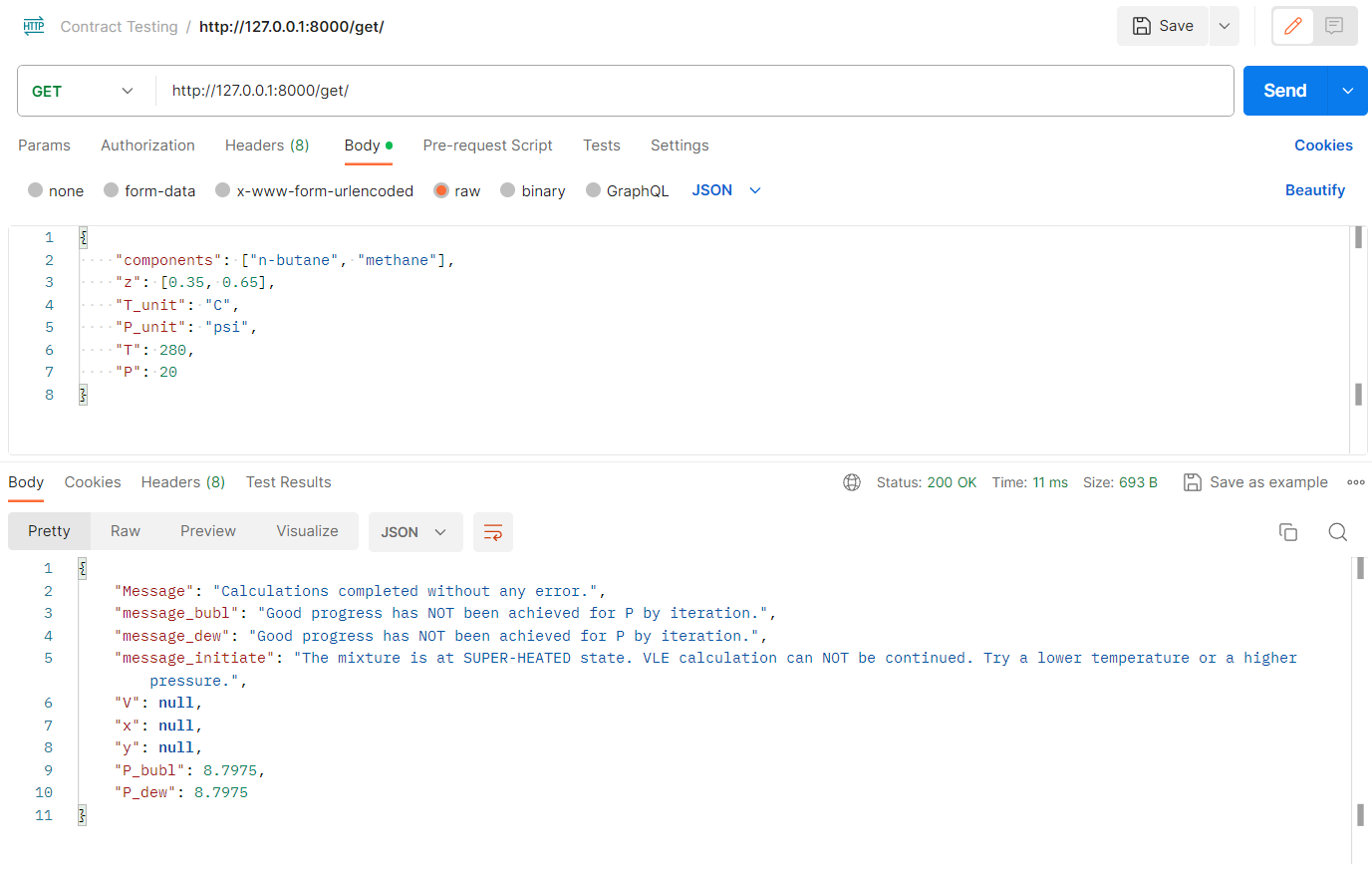
Make API Requests with Postman
Postman is a sofware that helps developers to test and develope their APIs. With Postman you can easily make requests and see the results in various formats.
You can see a sample that I have used while developing the API: